
Tooling Diagnostics

TechTips Hub / Troubleshooting / Turning
Reference & Diagnostics
Turning Troubleshooting Chart
Poor finish, chatter, chips that will not break, or inserts that wear or crack early? Tap the symptom you see on the part or the insert to get the likely causes and what to do about each one.
Part & Chip Control
Poor Surface Finish
| Likely cause | What to do |
|---|---|
| Feed rate too great for nose radius |
|
| Low cutting speed | Increase cutting speed |
| Poor shearing action |
|
Part & Chip Control
Workpiece Chatter / Vibration
| Likely cause | What to do |
|---|---|
| Poor set-up | Use sharp inserts |
| Improper insert selection |
|
Part & Chip Control
Unacceptable Chip Control
| Likely cause | What to do |
|---|---|
| Chip too thin |
|
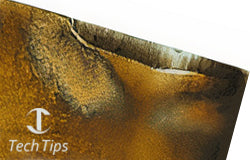
Poor Insert Life
Flank Wear
| Likely cause | What to do |
|---|---|
| Excessive heat |
|
| Work material microstructure contains carbides | Use harder carbide grade |
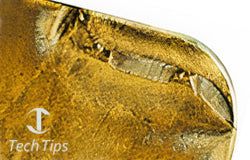
Poor Insert Life
Crater Wear
| Likely cause | What to do |
|---|---|
| Excessive heat at chip/tool interface |
|
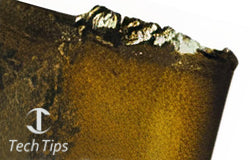
Poor Insert Life
Built-up Edge
| Likely cause | What to do |
|---|---|
| Poor shearing action |
|
| High cutting forces | Use more positive chipbreaker |
| Low cutting speed | Increase speed |
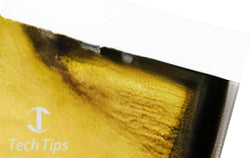
Poor Insert Life
Chipping
| Likely cause | What to do |
|---|---|
| Chatter, vibration |
|
| Built-up edge |
|
| Excessive cutting force |
|
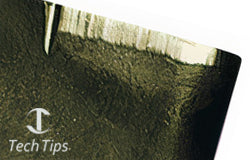
Poor Insert Life
Depth-of-Cut Notching
| Likely cause | What to do |
|---|---|
| Scale part |
|
| High work hardening materials |
|
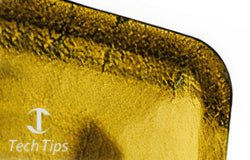
Poor Insert Life
Thermal Cracks
| Likely cause | What to do |
|---|---|
| Extreme variation in cutting temperature |
|
| Interrupted cut | Use stronger chipbreaker |
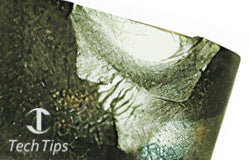
Poor Insert Life
Fracture
| Likely cause | What to do |
|---|---|
| Extreme cutting conditions, excessive cutting force, chatter |
|
No problem in this chart matches that search. Try a shorter word, such as a symptom (chatter, wear) or a fix (coolant, feed). Or ask our team.
Need a better insert for the job? Our team can help match a turning grade and chip breaker to your material and setup.
Other troubleshooting charts
Reference: FM Carbide turning application guidelines. Each problem can be linked directly. For example, add
#surface-finish to the end of this page’s address.Shop FM Carbide
Find tools for your application
Browse the tools that go with this page, then check the specifications against your material, dimensions and setup.